
Cadpage
CADPageCommunication
4.31.80K Reviews
- Version
- 2.2.13-26GR
- Installs
- 100.00K
- Age Rating
- Everyone
Screenshots
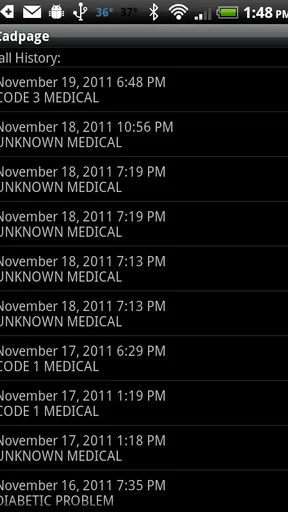
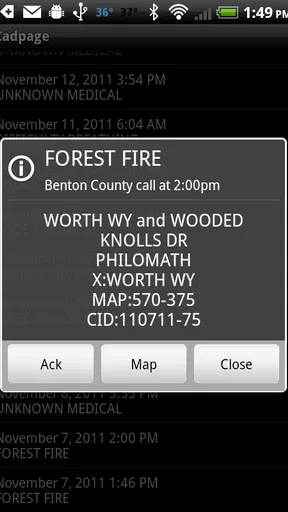
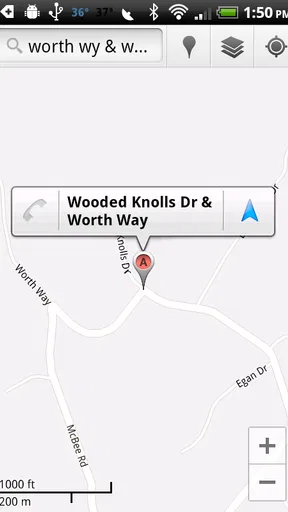
Our Review of Cadpage
 Analysis by Appyee
Emergency response tools are judged differently from ordinary communication apps. A delayed message is annoying; a missed dispatch can affect an entire response. I approached Cadpage with that standard in mind, focusing less on its simple store wording and more on the practical question: can it help a firefighter or EMS responder notice an incident and act without adding unnecessary confusion?
My overall impression is that this is a specialized Android communication app rather than a general-purpose messaging service. Its purpose is narrow, and that is a strength when your work already depends on emergency incident information. It is developed by CADPage, is free to install, and is suitable for Everyone from an age-rating perspective. The app has been available since August 15, 2010, which gives it a long history in a category where reliability and familiarity matter more than flashy presentation.
The current release is version 2.2.13-26GR and requires Android 6.0 or later. It has passed the point where it feels like an obscure experiment: the app has more than 100 thousand installs, an average rating of 4.3, and roughly 3.8 thousand ratings alongside about 1.8 thousand written reviews. Those figures do not replace hands-on judgment, but they do suggest that many users have made it part of an established response routine.
Where Cadpage is most useful—and where people get stuck
The most useful way to think about this app is as an alert and incident-response aid for people who already receive emergency call information through a compatible workflow. It is not something I would install casually just to follow local events, and it should not be treated as a replacement for official dispatch procedures, radio communication, or the instructions of a department or agency.
That distinction matters because expectations can cause more trouble than the application itself. A new user may expect a normal chat inbox, a public incident map, or a universal feed of every emergency call nearby. That is not the right mental model. The value comes from turning the kind of dispatch information a responder is already expected to monitor into something easier to notice and act on.
In my experience, the first point of friction is usually not the main screen. It is the setup around the app: identifying the correct source, entering the right local configuration, and making sure the phone is allowed to deliver alerts in the background. If any of those pieces is wrong, the app can appear inactive even when the phone and the service are functioning normally.
There is also a human factor. In an emergency setting, a responder may be moving between a station, a vehicle, home, or a weak-signal area. A notification that is technically delivered but easy to overlook is not especially useful. I would therefore judge Cadpage by whether it fits an existing response habit: the phone should be positioned where alerts are visible or audible, and the user should know what to check before assuming that a quiet period means the app has failed.
A realistic example is a volunteer responder who keeps the phone nearby overnight. An incident arrives while the phone is locked, the responder sees the alert, checks the location and call details, and then follows the department’s normal response process. Cadpage can make that first notice more practical, but it does not decide whether the responder should respond, replace radio traffic, or provide authority to enter a scene.
The setup checks I would make before relying on it
I would begin by confirming that the device is running Android 6.0 or newer. That sounds basic, but emergency tools are poor candidates for “maybe it will work” testing. If the operating system is below the requirement, troubleshooting notification behavior is wasted effort. On a supported phone, I would then install the app from the official Android source and open it while I have time to complete the initial configuration carefully.
The next check is the local dispatch source or configuration. Cadpage is not equally useful with an arbitrary source of text; it needs information in a form it can work with. I would use the setup instructions associated with my department or local service rather than guessing at a source based only on its name. A nearly correct configuration can be more confusing than an obviously missing one because it may create intermittent or incomplete results.
After configuration, I would send a harmless test message through the normal channel if the organization permits that, or verify the arrangement with someone responsible for the dispatch system. I would not create a fake emergency or alter a live communication channel simply to test an app. The goal is to confirm that the expected message reaches the phone and that the resulting alert contains enough information to identify the incident.
Android’s own notification controls deserve attention. I would check that notifications are enabled for the app, that the relevant notification channel has not been silenced, and that the phone is not hiding alerts on the lock screen. Sound and vibration settings should match the responder’s actual environment. A phone set to silent during a workday may be perfectly configured but still unsuitable for a responder who expects an audible alert.
Battery-saving behavior is another practical checkpoint. Different Android phones handle background activity differently, especially when a manufacturer adds aggressive power management. I would look for the device’s battery or background-use controls and make sure Cadpage is not being stopped when the screen is off. I would not assume that every phone exposes the same menu or uses the same wording, so the safest approach is to check the device’s own support guidance rather than blindly changing unrelated settings.
One useful habit is to separate “the app did not receive anything” from “the app received something but did not alert me.” Those are different problems. If a test message appears inside the app but produces no sound, the likely trail leads through Android notification settings, volume, focus modes, or battery controls. If nothing arrives at all, I would first revisit the source and account or service configuration before reinstalling.
How I would recover the workflow after a missed alert
When an alert appears to be missing, I would resist the instinct to repeatedly tap buttons or clear the app immediately. First, I would check whether other messages from the same source are arriving. If they are, the issue may involve the particular message format or the way that incident was addressed. If no messages are arriving, the problem is more likely to be upstream, connectivity-related, or caused by background restrictions.
I would also check the phone’s recent notification history if the device provides it. This can reveal that an alert was delivered but dismissed, grouped, or muted. That small distinction is valuable: it tells me whether I should adjust the phone’s presentation of alerts or investigate the delivery path. Android menus vary, so I would use the exact options available on the handset rather than expecting a universal sequence.
For a responder who uses multiple phones or changes devices, I would document the working setup in plain language. Record the local source, the important notification choices, and the steps used to confirm a test. This is not glamorous, but it prevents a common failure pattern in which a replacement phone is configured from memory and one overlooked setting leaves the user believing that the service has stopped.
Restarting the phone can be a reasonable general troubleshooting step after an operating-system update or a long period of unusual behavior. Reopening Cadpage and checking its configuration can also help identify whether a setting was reset. I would avoid treating a reinstall as the first solution, because it can remove local configuration and create a second problem while the original cause remains unknown.
The app includes in-app purchases priced at around ten dollars per item. I would treat any purchase decision carefully and only after the basic workflow is working. Paying for an option does not solve a disabled notification channel, an incorrect source, or a dispatch system that never delivered the message. The sensible order is to establish reliable reception first, then decide whether an optional purchase has a clear benefit for the particular response setup.
Another recovery tip is to keep a second communication path in mind. Cadpage should support a responder’s established process, not become the only way that person learns about an incident. If the department uses radio, paging, phone calls, or another official channel, those remain important when the app, handset, mobile connection, or local configuration behaves unexpectedly.
When Cadpage is not the cause of the problem
It is easy to blame the visible app because it is the part sitting on the phone. Yet emergency notifications depend on a chain: the incident must be entered, the source must distribute it, the message must travel through the network, Android must allow the app to run and notify, and the user must be able to notice the alert. Cadpage can only handle its part of that chain.
If a dispatch source is delayed, unavailable, incorrectly formatted, or missing an incident, an app on the receiving phone may have nothing useful to process. The same applies to a mobile connection that is unavailable at the wrong moment. I would compare the phone’s behavior with another trusted channel before concluding that the application is responsible for a wider outage.
Message quality also matters. A responder may receive an alert but still find it difficult to act if the underlying incident text is incomplete, ambiguous, or missing a usable location. That is not the same as a notification failure. The app can present what it receives, but it cannot repair information that was never included in the source.
This is where Cadpage differs from ordinary messaging apps. A general messenger is designed around conversations between people, while this tool is tied to an operational stream. A consumer alert app may be easier for broad public notifications, and an agency’s official application may be preferable when the organization controls a dedicated system. On the other hand, those alternatives may not fit a responder who needs this particular dispatch-oriented workflow. The best choice depends on the source your department already uses, not on which app has the most attractive interface.
I would also skip Cadpage if I only wanted general local news, neighborhood safety updates, or casual communication. Its narrow purpose would add setup work without solving those needs. Likewise, someone who is not part of a firefighter or EMS response workflow should not assume that installing it alone will provide meaningful emergency information.
What I like about the day-to-day experience
The strongest quality is focus. Cadpage is built around the moment when an incident needs attention, rather than trying to become a complete social, mapping, or messaging platform. That makes it easier to evaluate: either it fits the responder’s dispatch path and helps surface the information, or it does not. I appreciate that clarity because emergency-related software benefits from fewer distractions.
I also like the way the app encourages a practical division of responsibility. It can help present an incident, while the responder remains responsible for following local procedures and making safe decisions. That may sound obvious, but it is an important boundary. Software should reduce friction in receiving information, not encourage users to treat a phone alert as a substitute for training, command, or situational awareness.
The long availability of the app is reassuring in a modest way. A tool that has remained in use since 2010 is more likely to be familiar to experienced users than a brand-new service, and the current rating of 4.3 indicates a generally positive reception. Still, I would not select it solely because of its age or rating. The local configuration and the reliability of the underlying source matter more than a store page score.
The main weakness is the amount of context a new user must understand. The app is not a one-tap installation followed by instant usefulness. A person may need help identifying the correct source, checking Android’s restrictions, and learning how their department expects alerts to be handled. That is reasonable for a specialized tool, but it means the first setup should happen before the user depends on it.
Another limitation is that phone behavior can vary widely. A configuration that works smoothly on one Android device may need attention on another because of notification grouping, lock-screen presentation, power management, or sound profiles. I would not call that entirely Cadpage’s fault, but it is part of the ownership experience and should be included in any honest decision.
My practical verdict for responders
I would recommend Cadpage to firefighters and EMS responders who already have access to a compatible incident-dispatch workflow and want a focused way to receive that information on an Android phone. The free entry point makes it easy to evaluate, and the app’s specialized design is more relevant to that audience than a general messaging application.
I would install it during a quiet period, complete the source configuration with the correct local guidance, verify Android notification and battery settings, and perform a safe test before depending on it. I would also keep the official communication channels active. That preparation is not optional polish; it is the difference between an app that is merely present and one that fits a real response routine.
For someone looking for a public emergency-news feed, a family chat tool, or a universal replacement for department communications, I would choose something else. For a responder whose organization already uses the kind of dispatch information Cadpage is meant to handle, its narrow focus can be exactly what makes it worthwhile.
In short, my recommendation is positive but conditional: the most important feature is a correctly connected workflow, not the installation itself. Once the source, Android settings, and response expectations are aligned, Cadpage can be a useful part of emergency incident awareness. If alerts fail, investigate the entire delivery chain before blaming the app, and never let it replace the official methods that keep responders informed and safe.
Verdict
Strengths of Cadpage
- Quickly identifies emergency dispatch details from supported messages.
- Can help volunteers monitor calls without constantly checking email or texts.
- Useful filtering options make relevant incidents easier to find.
- Provides location details that may assist with navigation and response planning.
- Designed for practical use by responders rather than casual entertainment.
Limitations of Cadpage
- Requires compatible dispatch messages and may not work with every agency.
- Information can be delayed if the original alert arrives late or incomplete.
- Some features may depend on an active Cadpage subscription or service access.
- Emergency details may contain errors and should be verified before responding.
- The interface can feel dated compared with newer emergency-response apps.
Similar Picks in This Category
View All
Google Messages
Google LLC4.6

Gmail
Google LLC4.1

Google Meet
Google LLC4.4

Google Chrome
Google LLC4.1

WhatsApp Messenger
WhatsApp LLC4.6

Carrier Services
Google LLC4.2
Frequently Asked Questions
What is Cadpage and what does the app do?
Cadpage is a mobile alert application designed to help users receive and organize emergency dispatch information, particularly calls involving fire, rescue, and police services. It can translate supported dispatch messages into easier-to-read notifications and may provide details such as the incident type, location, and time. Availability and supported services can vary by region, so users should confirm that their local dispatch system is compatible before relying on it.
Does Cadpage work in every country or with every emergency service?
No. Cadpage depends on access to compatible public dispatch feeds or messages, and coverage is not universal. During testing and setup, the app’s usefulness largely depends on whether your county, municipality, or emergency organization is supported. Before downloading, check the available service list and local configuration options. Cadpage should be treated as an informational tool, not as an official replacement for emergency communications or direct contact with emergency services.
Does Cadpage require a subscription or include in-app purchases?
Cadpage’s pricing and available features can depend on the version distributed through the Android or iOS store and on the developer’s current service model. Some functions may be free, while advanced options, advertising removal, or continued access to certain features could require payment. Review the store listing carefully before installing, including subscription terms, trial periods, and renewal conditions, because pricing and availability can change over time.
Can Cadpage send alerts when the phone is locked or the app is closed?
Cadpage is intended to deliver notifications without requiring users to keep the application open constantly, but reliable alerts depend on several settings. Notifications, background activity, battery optimization, mobile data, and sound permissions must be enabled. Some phones may delay alerts when power-saving modes are active. After installation, users should test notification behavior and avoid assuming that a delayed or missed alert is impossible.
Is Cadpage suitable for professional responders and emergency personnel?
Cadpage can be useful for volunteers, first responders, off-duty personnel, and people who want to monitor local dispatch activity, especially when they need readable notifications and quick access to incident details. However, it should not replace an agency’s official paging system, radio, CAD platform, or operational procedures. Information may be delayed, incomplete, or unavailable, so professional users should follow their organization’s approved communication channels and safety policies.
